Sachivalayam'S

  • Volunteer
    • Volunteer Contact Numbers
  • sachivalayams
  • Mandal
  • District
  • CONTACT US
You are here: Home / Archives for Aadhar Card

Aadhar Card Download | Print Duplicate Aadhar Card | E-Aadhar Card Online Application tracking

May 27, 2021 by admin Leave a Comment

Downloading the Aadhar Card print (आधार कार्ड)  is now so easy for the Indian Citizens. For this purpose, we are introducing you with this update, which will tell you about Aadhar Card Online Application tracking as well as How to download the duplicate Aadhar Card or Copy of Aadhaar Card.

Aadhar Card Print – Download Duplicate Aadhar Card | Aadhar Card Online Application tracking

Many people got worried after misplacing their Aadhar Card, also they usually cried a lot too, because Aadhar Card is a proof of your Nationality in India, which is generally used to make Passport, Pan Card, Visa & many other Official documents provided by Government. Your Aadhar Card is also needy for school and colleges, basically for admission purpose) now a days. But, you don’t have to worry about your misplacing your Adhar Card, although you can easily download the copy of Aadhar Card Online as well take a Print Offline too. You Just need to know you Aadhaar Card Number (unique 12-digit government identification), which you can easily check online by following some steps. It is issued by the Unique Identification Authority of India on behalf of the Indian government.

The good thing about Aadhaar is that unlike some other identity cards, its digital copy, downloaded from the UIDAI website, is as valid as the original card. So whether you’ve misplaced your card and need a new one, or just wanted to get a digital copy of the card to submit with a form online, the official website has you covered.

But before trying to print your aadhar card (आधार कार्ड) , ask yourself a question , “Why do you need an aadhar card” ?
To answer that, aadhar card is your basic identity card, it is needed when you apply for a credit card or maybe passport and everywhere else where you are supposed to prove your identity. Me being a webmaster, I use this to get a peerfly account approved and it works! some can use it for adsense also. The point is, when ever you want to prove your identity you can use this apart from driving license, passport, etc. And aadhar card contains unique 12 digit number which is unique (Imagine the population of india, a small 5-7 digit cannnot work for a billion people) Now as you know why aadhar card is necesarry, you may proceed for the printing purpose.

Enrolling for Aadhaar Card is free and so is the process to obtain a digital duplicate; just follow the steps below and you’re done.

  1. How to Get your UID Number of Aadhaar Card/Getting Your UID Number:

To download a copy of the Aadhaar card, you need to know your UID number or your Enrolment ID. If you’ve already noted down the UID number from your Aadhar somewhere else, then It would be easy to get the copy of that If you don’t know about Enrolment ID as well as UID number, then you have to follow further steps to get that-

  1. Go to the UIDAI website : https://uidai.gov.in/
  2. Make sure that Aadhaar No (UID) is selected from the two options near the top of the screen. Type in your full name, as printed on the Aadhaar card.
  3. Type either the email address or phone number that you used to register for Aadhaar.
  4. Enter the characters you see in the image above Enter the Security Code. Now Click Get OTP.
  5. A one-time password will be sent to your email address or phone number, whichever you entered in the form. Enter this password in the form next to Enter OTP.
  6. Click Verify OTP. Now you’ll receive your Aadhaar number on via SMS or email.

How to get Copy of your Aadhar Card/Aadhar Card Online Application tracking/Aadhar Card Print:

Once you have the UID number, you can use it to download a copy of your Aadhaar card. This part is also simple:

  1. Head to the e-Aadhaar page on the UIDAI website. Select Aadhaar next to I have.
  2. Enter your Aadhaar number, full name and the PIN code of your residential address. Key in the characters in the image in the field Enter above Image Text.
  3. Click Get One Time Password. This one-time password will be sent to your phone number if you click Confirm in the pop-up. Alternatively, you may click Cancel and have it sent to your email address.
  4. Enter the password you received into the form next to Enter OTP.
  5. Click Validate & Download Print Online.

E-Aadhaar Download Instructions:

Download from UIDAI Portal

You can download with UID number or enrolment number.
You should have valid mobile number linked to your UID to get OTP.

If your mobile is not able to get OTP or not linked to your UID:

Get your mobile number updated online.
Download E-Aadhaar after updates are completed.

Keep in touch with us for more updates regarding Adhar Card Status Online.

If you have any queries or question then you may comment below and we’ll try to get back to you as soon as possible.
Filed Under: Aadhar Card

Aadhaar Card Status | How to Check Aadhar Card Status Online?

May 27, 2021 by admin Leave a Comment

Check your Aadhar card status : You have successfully submitted all your documents for Aadhar card and completed finger print scanning and iris scanning and eagerly waiting for it to come on your address, here you in this article we explain how to check Aadhar card status online. Its just like a piece of cake! You can check your Aadhaar card status easily but remember, after completing all the formalities , 3 months are taken to deliver your Aadhar card on your residential address. You will need Aadhaar card enrollment slip which was given to you at enrollment center after completing enrollment process. So keep it ready to check your Aadhaar card status.

Why is Aadhar card Necessary?

A new points has been added to our discussion that why Aadhar card is very much needed! Do you want to know that? Well, according to patrika, you won’t be allowed to enter an examination without Aadhar card. Source.

www.uidai.gov.in First go here: https://eaadhaar.uidai.gov.in , after that enter your 14 digit enrollment number to check your Aadhaar card status online.

How to Check Aadhar card status through SMS?
You also have the facility to check your uidai card status through SMS which is a very handy process for someone. You can check Aadhar card status by sending a SMS to 51969. To check Aadhar status by Phone, send an sms “UID STATUS <14 digit enrollment number>” , to the above given number. Now the thing is that if you have sent the SMS through the registered mobile number for that same enrollment number and your aadhaar card is processed then you will receive your 12 digit Aadhaar card number. But if you sent SMS through some other mobile number or if your Aadhaar card is not yet processed then you will receive the current status of your Aadhaar card on your phone.

Once you get to know your card status, and if it is available then you can Download E-Aadhaar card online on our blog, After that you can print your UIDAI CARD before it arrives at your postal address. If you need any help regarding the steps mentioned in our tutorial then just comment below and we are more than happy to help.

How to update aadhar card?
Are you stuck and want to know how to update aadhar card? Then don’t worry the video below gives complete step to step guide on how to update mobile number in Aadhar card or any other detail which you want to. If you want a word to word tutorial then click here.

How to check www.uidai.gov.in card / Aadhar card status
For checking uidai card status, you may follow the above given steps and it will help you to know about your card status. However, if you are thinking that what is the difference between uidai card and aadhar card then let me explain, both are same cards! UIDAI stands for Unique Identification Authority of India, it’s the authority which issues aadhar card for people. Commonly, people think that there’s a difference between two, but no, both the terms stand for one and only Aadhar card. For further help on uidai.gov.in , you may check other posts, for that click here.

Eaadhaar.uidai.gov.in Help
If you require any more help regarding uidai.gov.in then you may visit eaadhaar.gov.in site and that will guide you through or you may contact me by sending me an mail on my ID. Before throwing your queries regarding Aadhar card towards me, I suggest you to first read all the posts present in our blog to find solution of your problem, you can easily navigate through them from the sidebar. But if, there’s still a problem which we haven’t solved then you may comment below defining your problem regarding e Aadhaar card and we’ll surely get into the matter.

Well, till now, there is no means by which you can check Aadhar card status by name. As you see, the idea of checking Aadhar status via name is not practical as India’s population is in billion and hence, there will a lot of people with same name and same date of birth. But you can check Aadhar card status from online site or by sending a sms like we described above. .

So here we presented how you can check Aadhaar card status online uidai.gov.in | www.uidai.gov.in Aadhaar card status online. Hope you have a clear knowledge on how to check Aadhaar card status online.

If any queries regarding above topic, please tell us through below comment session.

Filed Under: Aadhar Card

How to Download Aadhaar Authentication History Online

May 27, 2021 by admin Leave a Comment

Are you looking for Aadhar History Online ? Then you are correct place to find the process to check Aadhar History Online as well as download PDF file and PDF file password help.

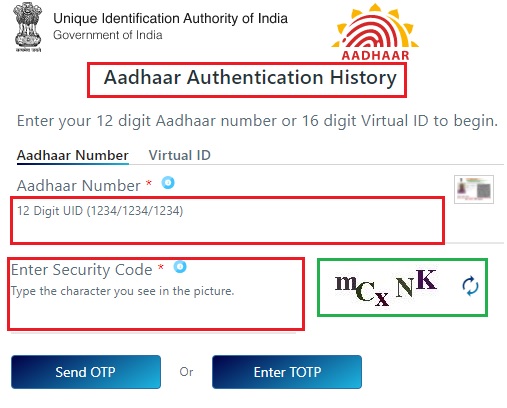
Aadhaar Authentication History

Aadhaar-Authentication-History

Detailed Process :

Open link : https://resident.uidai.gov.in/aadhaar-auth-history

Enter your 12 digit Aadhaar number or 16 digit Virtual ID to begin

Enter Security Code

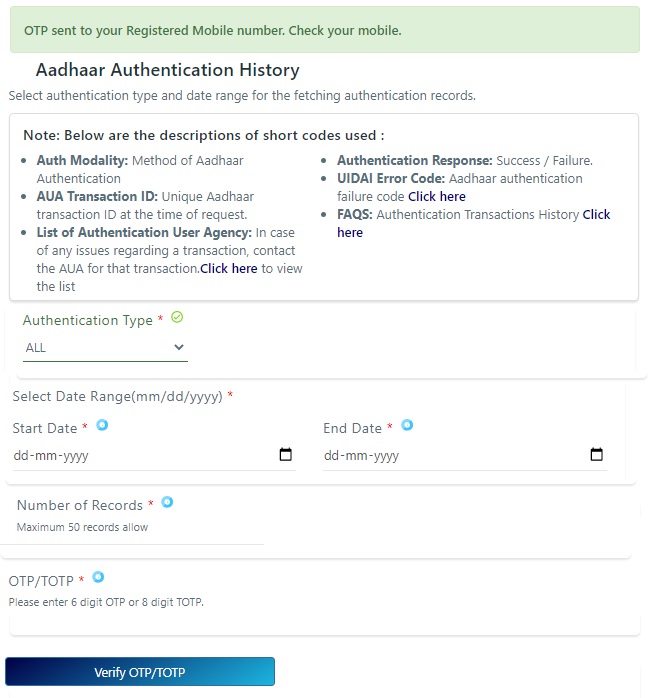
Then click on “Send OTP” then you will direct to the followed image page

Aadhaar-Authentication-History-OTP

Now you will receive OTP to your Aadhar Card registered Mobile Number

Select Authentication Type “OTP“

Select Date Range upto “6 Months” Only

Enter “Number of Records” (Maximum 50 records allow)

Enter OTP and click on “Verify OTP” button

Now you will see “Aadhaar Authentication History” Record

At bottom of the history click on “Download” Button (Password Protected ODF file)

Now open the PDF file and enter Password to take it printout.


Aadhaar Authentication History PDF file Password find

Combination of the first 4 letters of name in CAPITAL and the year of birth (YYYY) as password.

For Example:

Example 1

  • Name: SURESH KUMAR
  • Year of Birth: 1990
  • Password: SURE1990

Example 2

  • Name: SAI KUMAR
  • Year of Birth: 1990
  • Password: SAIK1990

Example 3

  • Name: P. KUMAR
  • Year of Birth: 1990
  • Password: P.KU1990

Example 4

  • Name: RIA
  • Year of Birth: 1990
  • Password: RIA1990

If any queries regarding above topic, please tell us through below comment session.

Filed Under: Aadhar Card

  • « Previous Page
  • 1
  • 2

District Wise Sachivalayam’s

SRIKAKULAM

VIZIANAGARAM

VISAKHAPATNAM

EAST GODAVARI

WEST GODAVARI

KRISHNA

GUNTUR

PRAKASAM

NELLORE

CHITTOOR

KADAPA

ANANTHAPUR

KURNOOL

Recent Posts

  • Volunteer Seva Mitra – Seva Ratna – Seva Vajra Grades for 2023 Year Update & 2022 List
  • YSR PENSION KANUKA – Helpline Numbers (District wise) – Key Contacts
  • AP Grama/Ward Volunteers Details Phase-I & Phase-II
  • APBOCWWB Deputy Commissioners of Labour Directory (Contact Details Dist wise)
  • YSR BHIMA DISTRICT WISE CONTACT DETAILS OF CALL CENTRES

Categories

  • Aadhar Card
  • Contact
  • District
  • Mandal
  • Navaratnalu
  • News
  • Online Status
  • PAN Card
  • sachivalayams
  • Telangana
  • Volunteer

Pages

  • About Us
  • Buy Adspace
  • CONTACT US
  • Disclaimer
  • Hide Ads for Premium Members
  • KNOW YOUR SECRETARIAT | మీ సచివాలయం గురించి తెలుసుకోండి
  • Privacy Policy

Recent Comments

  • Jyothi on VENU GOPALA SWAMY STREET (Code : 1063005) Sachivalayam’s Details | PITHAPURAM (URBAN) MANDAL | EAST GODAVARI DISTRICT | Andhra Pradesh
  • venkata rama raju tirumalaraju on GOPALAPATNAM (Code : 10390098) Sachivalayam’S Details | PAYAKARAOPETA MANDAL (RURAL) Area | VISAKHAPATNAM (DISTRICT) | Andhra Pradesh
  • Vidya Sri on VEPAGUNTA (Code : 1086492) Sachivalayam’s Details | GREATER VISHAKA MANDAL | VISAKHAPATNAM DISTRICT | Andhra Pradesh
  • K.siva on VENKATAPURAM (Code : 1018022) Sachivalayam Details | YEMMIGANUR (URBAN) MANDAL | KURNOOL (DISTRICT) | Andhra Pradesh
  • Sugurappakinikiri on Sachivalayams in ADONI (URBAN) Mandal | KURNOOL (DISTRICT)
  • V.S.THOPALLI on Sachivalayams in PADMANABHAM (RURAL) Mandal | Visakhapatnam (DISTRICT)
  • Pavan on ASHOK NAGAR (Code : 1123020) BADVEL Mandal Municipality Areas | KADAPA (DISTRICT) | Sachivalayam Details
  • Rekham Sridevi on SAMBA SIVA NAGAR COLONY-02 (Code : 1025002) SachivalayamS Details | PONNUR MUNICIPALITY | GUNTUR DISTRICT | Andhra Pradesh
  • Mounika on GUDAPALLI2 (Code : 10490920) Sachivalayam’S Details | MALKIPURAM MANDAL (RURAL) Area | EAST GODAVARI (DISTRICT) | Andhra Pradesh
  • Kamesh r on RAMACHANDRAPURAM (Code : 10190430) Sachivalayam’s Details | GARA MANDAL (RURAL) Area | SRIKAKULAM (DISTRICT) | Andhra Pradesh
  • PAKKI DAMODARA RAO on RAMACHANDRAPURAM (Code : 10190430) Sachivalayam’s Details | GARA MANDAL (RURAL) Area | SRIKAKULAM (DISTRICT) | Andhra Pradesh
  • Siva on SAMPARA (Code : 10490192) Sachivalayam’S Details | PEDAPUDI MANDAL (RURAL) Area | EAST GODAVARI (DISTRICT) | Andhra Pradesh
  • R.Bala krishna on ADIVITHAKELLAPADU-02 (Code : 1021179) SachivalayamS Details | GUNTUR MUNICIPAL CORPORATION | GUNTUR DISTRICT | Andhra Pradesh
  • Svijaya kumar on KOTHAPALLI (Code : 11090335) Sachivalayam Details | KUPPAM MANDAL (RURAL) | CHITTOOR DISTRICT | Andhra Pradesh
  • KAKARAPARTHI KANAKESWARARAO on MARELLA (Code : 10890644) Sachivalayam Details | MUNDLAMURU MANDAL (RURAL) Area | PRAKASAM (DISTRICT) | Andhra Pradesh
  • Dr. J. Swapna on Sachivalayams in JEELUGUMILLI (RURAL) Mandal | WEST GODAVARI (DISTRICT)
  • KVS Rao on RUSHIKONDA-02 (Code : 1086082) Sachivalayam’s Details | GREATER VISHAKA MANDAL | VISAKHAPATNAM DISTRICT | Andhra Pradesh
  • VS Rajkumar on SANIVARAPUPETA 1 (Code : 10590585) Sachivalayam’S Details | ELURU MANDAL (RURAL) Area | WEST GODAVARI (DISTRICT) | Andhra Pradesh
  • N Bansi on PENDURTHI LEFT (Code : 1086520) Sachivalayam’s Details | GREATER VISHAKA MANDAL | VISAKHAPATNAM DISTRICT | Andhra Pradesh
  • Th. Sreenivasulu on Sachivalayams in CHINAGANJAM (RURAL) Mandal | PRAKASAM (DISTRICT)
  • Lakshmanrao on JUJJURU1 (Code : 10690732) Sachivalayam’S Details | VEERULLAPADU MANDAL (RURAL) Area | KRISHNA (DISTRICT) | Andhra Pradesh
  • K swarupa on ANDHRA RATNA NAGAR (Code : 1032006) Sachivalayam Details | CHIRALA (URBAN)MANDAL | PRAKASAM DISTRICT | Andhra Pradesh
  • T.Hemachandrarao on APPUGHAR (Code : 1086093) Sachivalayam’s Details | GREATER VISHAKA MANDAL | VISAKHAPATNAM DISTRICT | Andhra Pradesh
  • Pujyam Naga vani hara vaishnavi on MUKKAMALA 1 (Code : 10590459) Sachivalayam’S Details | PERAVALI MANDAL (RURAL) Area | WEST GODAVARI (DISTRICT) | Andhra Pradesh
  • ADARI NOOKA APPA RAO on VENKATACHALAM (Code : 10990240) Sachivalayam Details | VENKATACHALAM MANDAL (RURAL) | NELLORE DISTRICT | Andhra Pradesh
  • ADARI NOOKA APPA RAO on VENKATACHALAM (Code : 10990240) Sachivalayam Details | VENKATACHALAM MANDAL (RURAL) | NELLORE DISTRICT | Andhra Pradesh
  • Mohammed Bilaluddin on NARAVA (Code : 1086399) Sachivalayam’s Details | GREATER VISHAKA MANDAL | VISAKHAPATNAM DISTRICT | Andhra Pradesh
  • Banoth Veeranna on PATAMATA-07 (Code : 1073054) Sachivalayam’s Details | VIJAYAWADA (URBAN)| KRISHNA DISTRICT | Andhra Pradesh
  • Dekantham Thatagari on PERUMALLAPALLE (Code : 11090225) Sachivalayam Details | TIRUPATI RURAL MANDAL (RURAL) | CHITTOOR DISTRICT | Andhra Pradesh
  • Dekantham Thatagari on PERUMALLAPALLE (Code : 11090225) Sachivalayam Details | TIRUPATI RURAL MANDAL (RURAL) | CHITTOOR DISTRICT | Andhra Pradesh

Copyright © 2025 · eleven40 Pro Theme on Genesis Framework · WordPress · Log in